Why Presentations Feel Harder Than They Should
An AI presentation creator has quietly become one of the most useful tools for modern work and study. Anyone who has ever tried to build a deck from scratch knows this pain. Opening up PowerPoint or Google Slides, with all good intentions just minutes later end up stuck adjusting fonts, fixing spacing, and wondering why the slide still looks unfinished.
This problem is common across many groups.
Students struggle to balance content with design.
Professionals lose hours polishing slides for meetings.
Small teams often lack dedicated design support.
Free AI presentation creators are changing this situation. Instead of starting with a blank slide, users now begin with a structured draft that already makes sense. These tools reduce repetitive work and help users focus on the message rather than layout details.
In this article, we review five free AI presentation creators that are popular today. The goal is not just to list features, but to explain which tools are practical for real use. Among them, TeraBox AI Presentation Maker Agent stands out as a strong option for users who want professional results without unnecessary complexity.
Key Features to Look for in a Free AI Presentation Creator
Before choosing any tool, it help you to understand what actually matters. Not every free tool offers the same level of help.
Ease of Use Comes First
A good presentation builder should feel intuitive. You should not need a tutorial just to get started. Clear buttons, simple instructions, and logical steps are signs of a well-designed tool.
If a tool feels confusing, it often slows you down instead of helping.
Smart Content Organization
AI should do more than decorate slides. A reliable AI presentation creator helps with:
- breaking ideas into slides
- keeping content balanced
- maintaining a logical flow
When content feels organized, the presentation becomes easier to follow.
Flexible Design Options
Templates are helpful, but flexibility is more important. The best tools allow you to:
- change layouts easily
- adjust text size
- refine visuals without starting over
This makes the slides feel personal instead of generic.
Practical Export Options
A free tool should still allow you to use your work outside the platform. Being able to export and edit slides later is essential.
Top Five Free AI Presentation Creators Compared
Free AI presentation creators are no longer experimental tools. Many are now good enough for real academic, business, and professional use. That said, not every tool works well for every type of user. Some focus heavily on design, others on speed, and a few try to balance structure with simplicity.
Below is a practical comparison of five well used free AI presentation creators.
TeraBox AI Presentation Maker Agent
TeraBox AI Presentation Maker Agent is built for users who value clarity and structure over unnecessary complexity. Instead of overwhelming users with design controls, this AI Presentation creator focuses on helping people move quickly from idea to organized slides.
What stands out most is how naturally the workflow feels. You start with a topic or rough idea, and the tool helps shape it into a clear slide sequence without forcing rigid templates.
What works well
- Automatically generated slide structures that make sense logically
- Clean, professional layouts suitable for business, academic, or client-facing use
- A smooth process that takes you from outline to finished slides with minimal friction
Things to consider
- Users looking for very advanced visual customization may find some features limited in the free version
Overall, TeraBox offers one of the most balanced free experiences available.
Canva AI
Canva AI is popular because it makes designs look attractive and gives users lots of creative freedom. People who like to customize slides and have control over every detail often prefer it. The AI tools in Canva are primarily meant for providing graphic ideas rather than putting your content in order. It becomes ideal for those individuals who have already figured out their message but need assistance making it look presentable and polished.
Strengths
- A large library of templates, graphics, and visual elements
- Simple drag-and-drop editing that feels intuitive
- Strong customization options for branding and style
Limitations
- AI support emphasizes design more than logical content flow
- Some export options and features are restricted in the free plan
Canva works best for users who enjoy manual customization and have time to refine visuals themselves.
Google Slides with AI Add-ons
Google Slides remain a familiar option for many users, especially those already working within Google Workspace. While it does not offer built in AI presentation creation at the same level as newer tools, it can be enhance with third party AI add-ons.
This setup works well for collaboration but requires more effort to achieve automation.
Strengths
- Real-time collaboration with team members
- Easy access from any device through the cloud
- Familiar interface for most users
Limitations
- AI features depend on external extensions
- Free versions offer limited automation and guidance
Google Slides is most effective for teams that already rely on Google tools and value collaboration over advanced AI assistance.
Slidesgo AI
Slidesgo AI focuses on speed. It is designed to create an initial draft of slides quickly so as to have something with which a user can work toward the completion of a presentation.
The tool is not difficult to use and results are produced very quickly, but its free version does impose some rather severe limitations that will be evident in final delivery.
Strengths
- Fast generation of basic slide layouts
- Simple and accessible interface
Limitations
- Watermarks appear in free exports
- Customization options are limited
Slidesgo helps to quickly throw up something onto the board but just like any other tool, manual intervention is required before it can be considered as a final presentation.
Tome AI
Tome AI works differently by putting forward story-telling and narrative flow. It finds particular use for creative presentations, startup pitches or conceptual ideas.
However, its structure and format may not suit more traditional presentation needs.
Strengths
- Modern, story-driven presentation flow
Limitations
- Limited compatibility with PowerPoint formats
- Restrictions in the free plan
Tome works better for creative pitches than it does for formal academic or corporate presentations.
Final Thoughts on Choosing the Right Tool
Each of these free AI presentation creators has its strengths. What makes one right is what matters most to you:
- Visual creativity
- Speed
- Collaboration
- Structure and clarity
Why TeraBox AI Presentation Maker Agent Stands Out
When comparing free tools side by side, TeraBox offers a rare balance between automation and control.
A Free Plan That Feels Useful
Many tools advertise free access but restrict core features. TeraBox allows users to create meaningful presentations without immediate pressure to upgrade.
This makes it especially valuable for:
- students
- freelancers
- small teams
AI That Thinks About Structure
TeraBox focuses on how information is presented. The AI:
- spreads content naturally
- avoids overcrowded slides
- keeps presentations readable
This helps users communicate ideas clearly.
How to Make a PowerPoint Presentation with TeraBox
Many users search for how to create PowerPoint slides efficiently. TeraBox simplifies this process.
Step 1: Log In
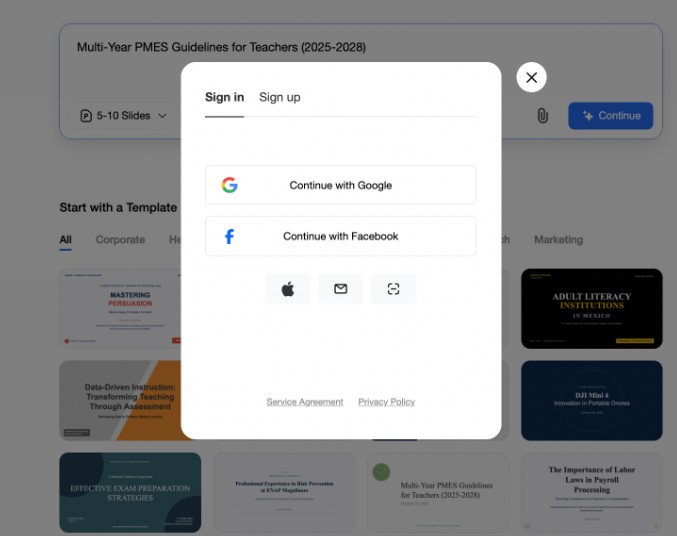
Access TeraBox on PC or Web and open the AI Presentation Maker Agent.
Step 2: Add Your Topic
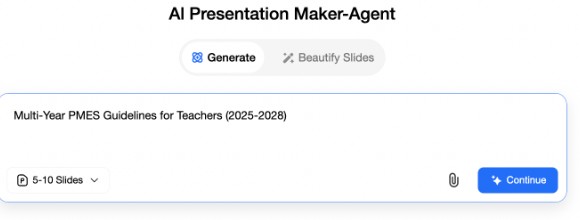
Enter a topic, short notes, or an outline. Even basic input is enough.
Step 3: Let AI Build the Slides
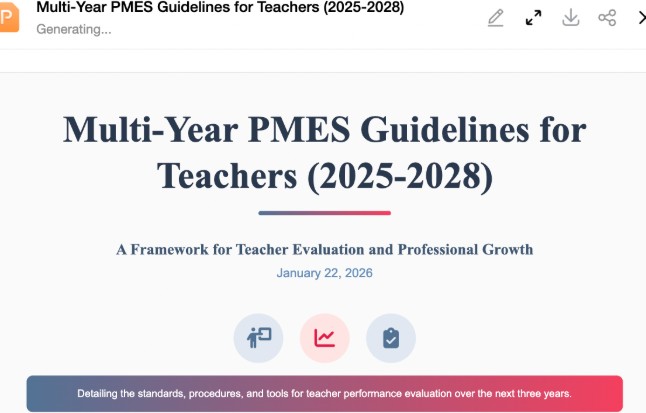
The tool automatically creates:
- slide titles
- structured content
- clean layouts
Step 4: Review and Export
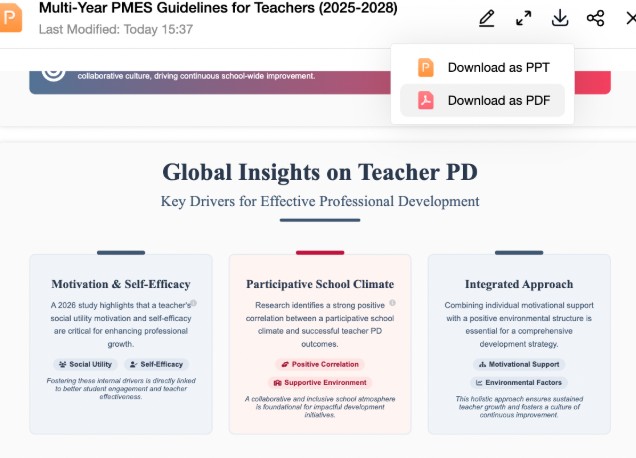
Make small edits if needed and export your slides. This answers the common question of how to make a PowerPoint presentation without starting from zero.
Conclusion
Make minor edits, if necessary, and export your slides, as this has also answered a generic query on how to make a PowerPoint presentation without starting everything from zero. They reduce effort, save time, and lower the barrier to professional design.
Among the tools reviewed, TeraBox AI Presentation Maker Agent offers a strong combination of usability, structure, and flexibility. Its free plan provides real value, and its workflow fits naturally into both academic and professional settings.
For anyone looking for an AI presentation creator that feels practical rather than complicated, TeraBox is a solution worth trying.